
Who contacted which buyer, when, and what was agreed? In many M&A boutiques, the honest answer is: it depends on whom you ask. Mandates run across Excel lists, email threads, data rooms and Word documents, and the full picture lives in people’s heads and inboxes.
That costs time on every mandate – for the CIM, buyer lists and status updates – and it creates risk when confidential documents are shared without clear permissions or an audit trail. This guide explains what M&A deal management software should do for sell-side brokers, corporate finance advisors and succession advisors.
Deals run in silos
A typical sell-side mandate involves five or more tools and more than a hundred buyer contacts to coordinate. Approvals sent by email leave no proof, and when a team member leaves, part of the mandate history leaves with them. The goal of deal management software is simple: one workspace per mandate, one view of all buyers across the firm, and a complete record of what happened.
Why a generic CRM falls short
Many firms start with a general-purpose CRM. It handles contacts well, but M&A work is organised around mandates, not around a sales funnel. The same buyer appears in several mandates at different stages, fees follow their own logic, and confidential documents need gated access. Without these concepts, the CRM becomes another list next to Excel instead of replacing it.
The checklist: what sell-side software should cover
- Mandates by phase: a board from acquisition and preparation through marketing and negotiation to closing, with mandate number, sale readiness, owner and next step on every card.
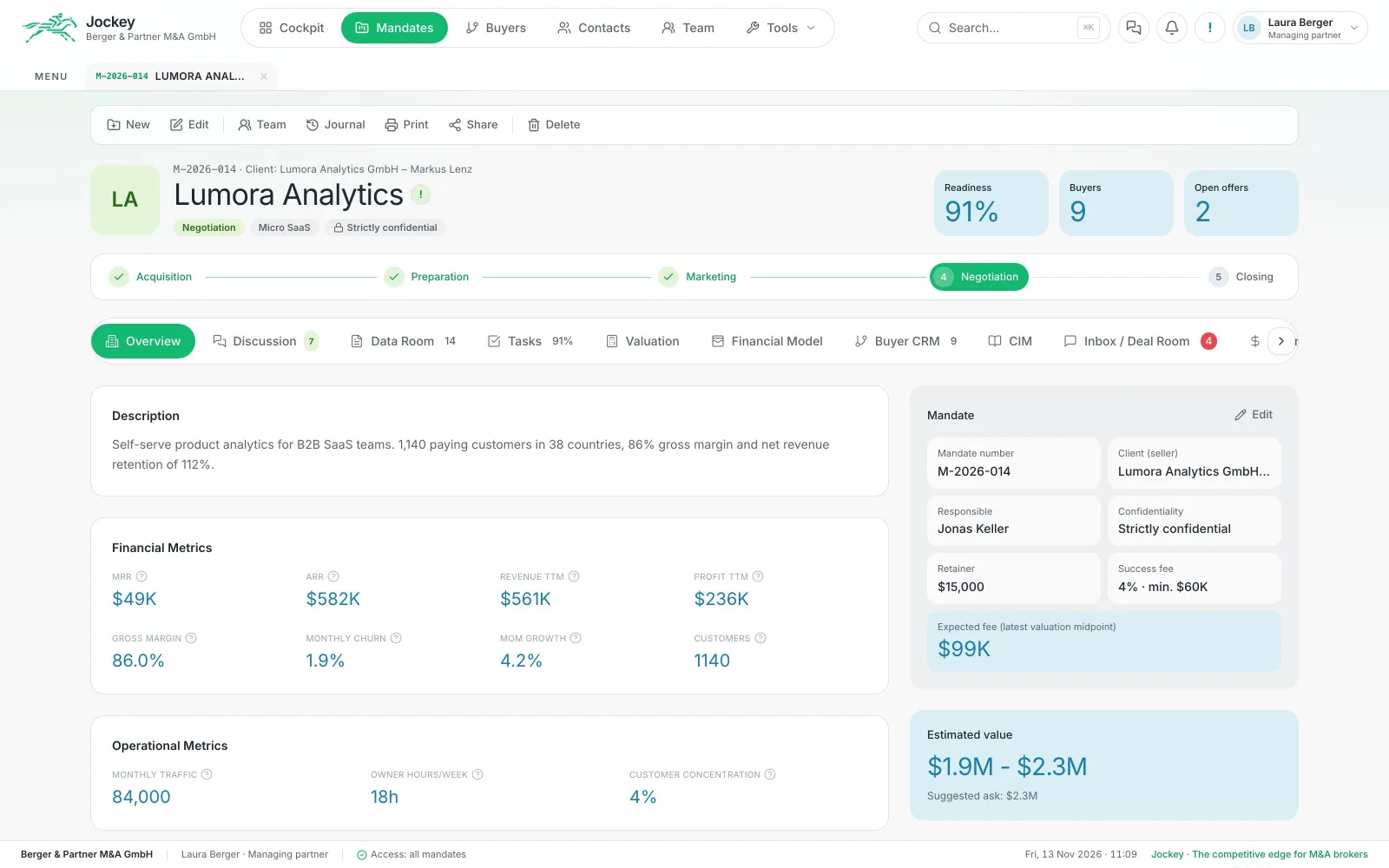
- A mandate workspace: client, phase, confidentiality, fee model (retainer, success fee, minimum fee) and everything else as tabs – data room, checklist, valuation, financial model, buyers, CIM, NDAs, offers and journal.
- A firm-wide buyer pipeline: every buyer relationship on one board, from longlist to signing, with weighted potential and the next action for each buyer.
- A data room: folders and versions per mandate, not a separate tool with separate permissions.
- NDA gate and buyer portal: buyers sign the NDA digitally, you review and release the data room, and every access is logged.
- Offer comparison: capture offers and counteroffers and compare them as a team.
- Collaboration in context: comments and @mentions directly on mandates, offers, buyers and tasks.
- A cockpit per role: partners see pipeline, fees and utilisation; deal managers see their mandates and next steps; analysts and assistants see what is due today.
- AI with sources: buyer research, CIM drafts and valuation support – with a source for every statement and a human review before anything leaves the firm.
Security and audit trail
Confidentiality is the foundation of every mandate. Look for permissions per mandate (everyone sees only their own mandates, fees stay with the partners), a complete journal of phase changes, approvals, file views and team changes – ideally without a delete function – and data-room access only after an approved NDA. If the software uses AI, ask which provider processes the data, whether you can use your own API key, and whether requests are excluded from model training. Our guide to AI agents with human control covers the governance side in more depth.
The business case
The main benefit is capacity: more mandates with the same team. A sample calculation for a firm of five people with eight sell-side mandates a year shows the order of magnitude. If the software saves about 25 hours on the CIM draft, 20 hours on buyer research and the longlist, 15 hours on status updates and reporting, and 10 hours on NDA handling, buyer portal and approvals, that is roughly 70 hours per mandate – around 560 hours a year, or about €84,000 at an internal rate of €150 per hour.
These are sample values for orientation, not a guarantee. Actual savings depend on your process, team size and mandate volume, so recalculate them with your own figures.
How to get started
A low-risk introduction has three steps: a 30-minute demo on a sample mandate tailored to your sell-side process; a pilot in which your team runs a real mandate in the new system, with support for setup and data migration; and a rollout with roles, templates and data-room structure for the whole firm, including training.
Frequently asked questions
What is M&A deal management software?
Software that brings mandates, buyers, documents and team communication of an M&A firm into one place – from acquisition of the mandate to closing – with permissions and a complete audit trail.
Can we use a normal CRM for M&A?
For contacts, yes. But M&A work is organised around mandates, phases, fees and gated documents. A generic CRM usually ends up next to Excel and the data room instead of replacing them.
How do we keep confidential documents secure?
Use permissions per mandate, release the data room only after an approved NDA, log every access and keep a journal without a delete function, so every step is traceable for clients and compliance.
How long does it take to introduce deal management software?
A practical path is a short demo, a pilot with one live mandate and then a rollout across the team. The pilot shows within weeks whether the system fits your process.
Related reading
More deals with less effort.
See Jockey on your own sell-side process in a 30-minute demo – and calculate your savings with your numbers.