
Leave requests on paper, working hours in Excel, ads reserved by calling across the office, news sent as all-staff emails and files spread over network drives: in many publishing houses, the daily organisation still runs on improvised tools. Each one works on its own. Together they cost hours every week.
An intranet can bring this work into one place. But a standard intranet built for document storage and news posts misses what makes a media company different. This guide covers the functions that matter for publishers, newsrooms, ad sales and agencies with up to 150 staff.
Why media companies need a different intranet
Media houses work in weekly and daily rhythms, often across several locations and editions. Ad sales, the newsroom, layout and administration depend on each other: a late booking changes the page plan, a sick colleague changes the editorial meeting, a special supplement needs sales and editorial at the same time. An intranet for media companies has to reflect these workflows, not just store files.
The 8 functions a publishing intranet should cover
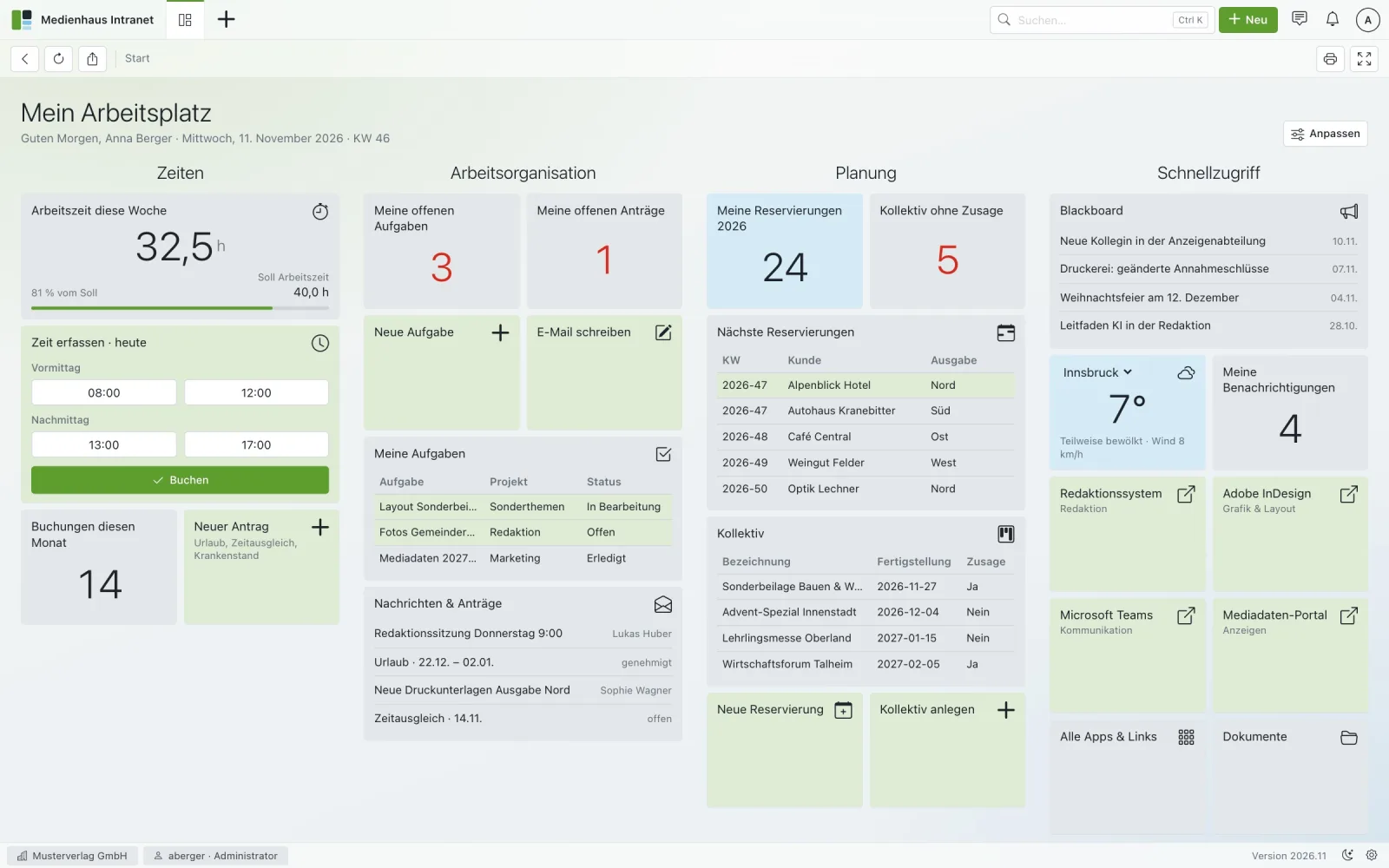
1. A personal dashboard
Every employee starts the day on one page: working time, open tasks and requests, upcoming reservations, news and quick links to the tools they use. A global search that finds customers, stories, colleagues and chats saves the rest of the searching.
2. Time tracking and leave without paper
Book today’s working hours in one click, see weekly and target hours, and keep balances for leave, sick days and time off in lieu up to date automatically. Requests from templates – leave, time off in lieu, sick leave – are approved in one click. Monthly payslips can sit securely in each employee’s login.
3. Ad reservations per week and edition
Ad sales needs a booking calendar by week, edition, position and format, with a colour per planner and filters by location and medium. Live utilisation – booked, free and overbooked – prevents double bookings before they happen. We cover this in detail in our guide to ad booking and flat planning.
4. The flat plan
A page plan per edition where ads and stories are dragged onto the pages. Page fill and ad share are visible at a glance, and positional requests from ad sales are taken into account early.
5. Story pool and editorial meeting
Ideas are collected in a story pool, rated by the team and decided in the editorial meeting with one click. Research briefs and owners stay attached to the story, and everyone sees who is away.
6. Special topics and supplements
Special supplements and joint campaigns move from enquiry to commitment on a Kanban board – visible to sales and the newsroom at the same time.
7. Documents, blackboard and notifications
Folders with owners, drag-and-drop upload and search replace scattered network drives. Internal news goes on a blackboard instead of all-staff emails, and notifications tell people when something relevant changes.
8. Team chat and a mobile app
Direct and group chats, @mentions in every form, and push alerts on the phone. Installed as an app straight from the browser, the intranet works on phones and tablets without an app store – important for reporters and sales staff on the road.
Rights, privacy and management figures
HR data needs clear rules. Rights per role make sure, for example, that only managers see sick leave. For management, a KPI cockpit shows ads per week and edition, newsroom figures and working hours – without collecting numbers from five spreadsheets.
How to choose an intranet for your media house
- Fit for media workflows: editions, ad reservations, flat plan and newsroom – not only documents and news.
- Language and region: a German-language interface and pricing in EUR for teams in the DACH region.
- Data protection: hosting in the EU and a data processing agreement under Art. 28 GDPR.
- Your data stays yours: a full export (CSV and files) at the end of the contract.
- Transparent pricing: clear plans by number of users, with all modules included.
- Your branding: company name, logo and accent colour, ideally in light and dark mode.
Rollout in days, not months
An intranet for a media company does not need a long project. A practical rollout looks like this: a 30-minute kick-off to clarify locations, departments, editions and users; two days of setup with logo, colours, modules and the import of employee data; a two-hour online training on time, leave, reservations and documents; and go-live on day five with support during the first weeks.
Frequently asked questions
What does an intranet for a publisher cost?
It depends on the number of users and the support you need. Medienhaus Intranet, for example, starts at €99 per month (net) for up to 15 users, with all modules included in every plan.
Can an intranet replace our ad booking spreadsheet?
Yes, if it includes ad reservations per week, edition, position and format with a calendar view and live utilisation. Existing reservations can usually be imported from Excel or CSV.
Does a media intranet work on smartphones?
A modern intranet can be installed as an app (PWA) on phones and tablets straight from the browser, with push notifications – no app store needed.
How long does it take to introduce an intranet?
With a standard setup, a media house can be working in the intranet within about five working days: kick-off, setup and data import, a short training and go-live.
Related reading
More time for content.
Try Medienhaus Intranet free for 30 days – set up, imported and trained in five working days.